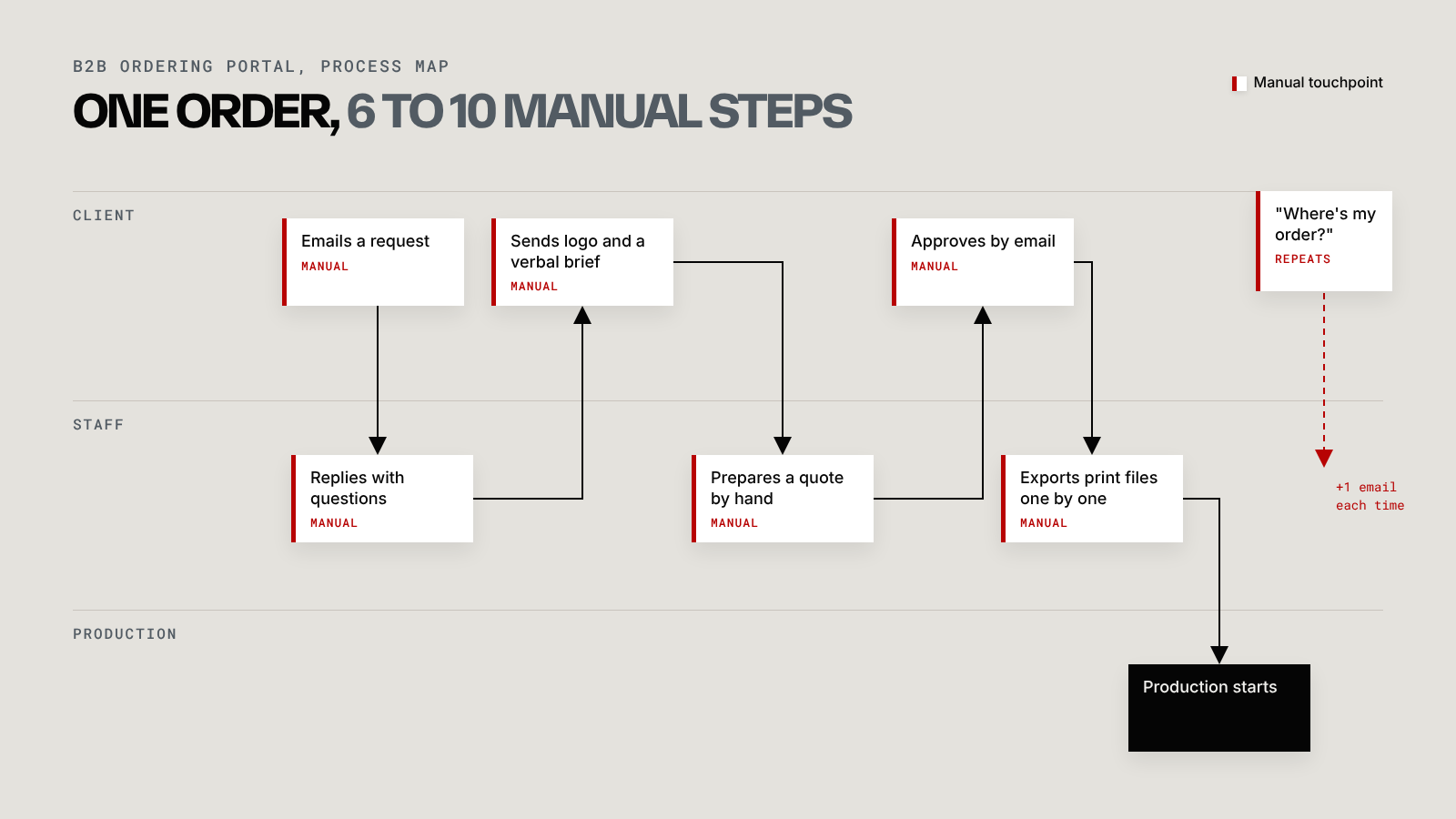
When I started on a B2B ordering portal for a branded workwear supplier, the brief was a new ordering system. Before drawing a single screen, I mapped the whole ordering workflow, from the client's first email to the moment an order reached production.
Every order took between 6 and 10 manual touchpoints. Emails went back and forth, customisation details were passed on verbally, and print files were exported one at a time. Clients had no way to see where their order was, so they emailed to ask, which added more steps.
None of that was visible from the brief. It only showed up once the whole journey was written down.
How I map an order
The method is simple enough to do on a whiteboard or with sticky notes.
- Pick one real, recent order. A typical one, not the messiest.
- Write every step on its own card, from first contact to production, including the small ones like "replies to confirm the colour".
- Mark who does each step: the client, your staff, or production.
- Mark where information gets typed in again. Each retyped detail is a chance for an error.
- Mark where someone waits or chases. Those are the moments clients remember.
Once the cards are on the wall, the problems tend to point at themselves.
What the map changed
Three design decisions came straight out of that map.
Customisation moved inside the order. The brief used to travel separately from the order, which is where details went missing. With a live customiser built into the ordering flow, the client places their logo and approves it as part of the order itself.
Print files started exporting themselves. Once the customisation lived inside the order, the system had everything it needed to produce the files, so a manual task disappeared.
Each group got its own view of the same order. Clients see status and tracking, staff see what needs preparing, and admins see everything across clients. One shared record means nobody has to ask where things stand.
Why skipping this step goes wrong
Without a map, a new portal tends to copy the existing process into nicer boxes. The emails become form fields and the verbal brief becomes a notes box, while the client still waits and chases.
Mapping usually takes a day or two. Redesigning a portal that digitised the wrong process takes months.
The full story is in the B2B ordering portal case study. If your orders run through more inboxes than they should, the ordering systems service starts with exactly this kind of map.