Over the past few weeks I've gone through the ordering side of a lot of print, merch and uniform websites, placing test orders the way a new customer would. Most of them have a good homepage, and then the quote form arrives and feels like filling in a tax return.
A buyer at that point wants two answers: roughly what this will cost, and when it will arrive. The form, meanwhile, wants fourteen fields and a phone number. That mismatch is where orders leak away, and it usually happens in the same five places.
1. The price shows up last, or never
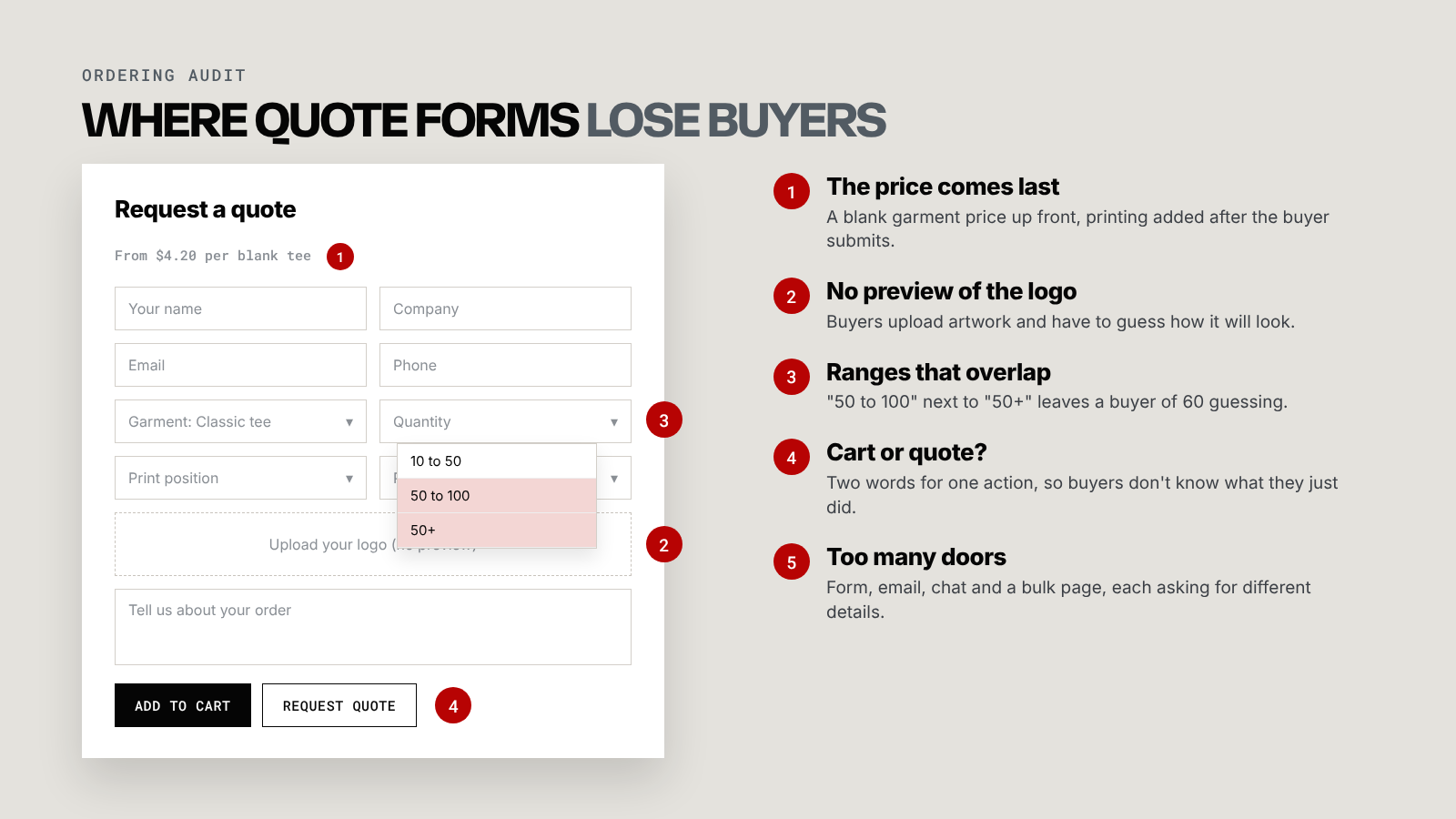
The most common pattern: the product page shows the price of a blank garment, and printing gets added later, often after the form is submitted. The buyer sees a cheap number, gets excited, then receives a quote that is double what they expected.
Some leave at that point. Others never submit at all, because a form with no price feels like a sales call waiting to happen.
The fix is a realistic "from" price that includes decoration for the quantities you sell most. You don't need a full calculator to do this. A small table showing the price per unit at 25, 50 and 100 pieces with a one-colour print answers the question most buyers came with.
2. Buyers can't see what they're ordering
Plenty of forms let customers upload a logo and then show nothing. The buyer has no idea whether you understood "left chest, small" the way they meant it.
A live mockup on the garment is the best version of this, but even a static preview with a few placement options removes a lot of doubt. Whatever you show, send a proof before anything goes to production, and say on the page that you will.
3. The rules on the page contradict the form
I regularly find a minimum order of 20 written in the product description while the form happily accepts an order of 1. I've also seen quantity dropdowns with options like "50 to 100" sitting next to "50+", so a buyer ordering 60 has to guess which one applies.
Every contradiction becomes an email thread later. Let the form enforce your actual rules, and make sure quantity ranges never overlap.
4. Two words for the same action
One page says "Add to cart". The next says "Request a quote". The buyer reasonably wonders whether they just bought something or asked for a price.
Pick one model for each type of product and label it the same way everywhere. Standard items with fixed pricing can go through a cart. Anything that genuinely needs a human to price it goes through a quote, and the button should say so from the first page.
5. Too many ways to ask
Some sites offer a quote form, a contact form, an email address, a chat widget and a separate "bulk orders" page, each asking for different information. A buyer picks one at random, and your team gets half the details they need.
Keep one path for quotes. Every other door, including the chat and the contact page, should lead back to it.
How to test your own form
Open your site on your phone as if you'd never seen it before, and try to order 50 printed tees. Time it, count the fields, and write down every moment you would have given up and emailed instead.
Those moments are your to-do list. If you'd rather someone else did the test order and handed you the fixes, that's how my ordering systems work starts, and you can see the same thinking applied to a full portal in the B2B ordering portal case study.